

Multi-Panel Grid to Video
Turn a comic page or storyboard grid into a coherent video, one beat per numbered panel
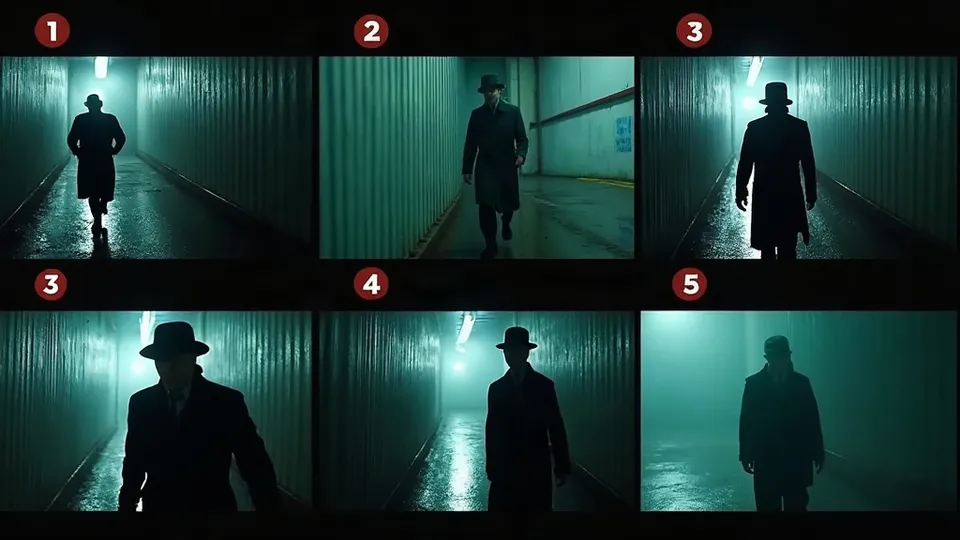
Turn a rainy-night detective chase story into a 6-panel storyboard sheet, then a 30s video following the panels
The full workflow below is sent to the Agent every turn.
# 多格分镜图转视频
适合两类需求:一是用户已经有多格漫画、宫格分镜、联系印样,想让它动起来;二是从一个故事出发,先为每个长镜头画一张「多格分镜图」锁定每个节拍的画面,再用这张图驱动视频生成,保证每一格的角色、构图和节奏都落地。最终交付:每张分镜图对应一段 5-10 秒、内部含 2-6 个切换的视频,整片 15-60 秒,附配乐/旁白方案。
## 开工前确认
- 先判断输入类型:
- **已有宫格图**:读出格子数、每格内容、阅读顺序(漫画常是右上到左下或左上到右下,务必跟用户确认),给每格编号。
- **只有故事**:先拆节拍,再由 AI 画分镜图。
- **有角色/场景参考图**:作为后续所有分镜图和视频的参考。
- 用 ask_user 一次问一个:画幅(16:9 / 9:16 / 1:1,每格的比例必须和成片一致);整体风格(写实电影 / 动画 / 漫画上色);是否要配乐或旁白。
- 一张分镜图最多 6 格;节拍更多就拆成多段,不要塞进一张图里看不清。
## 制作流程
1. **项目设定** —— 表格列出:片名、画幅、风格、总时长、段数、每段格数、配乐/旁白。**停下等确认。**
2. **分镜拆解** —— 每段(一个长镜头)列出内部节拍清单,给稳定编号 1…N,每条写:画面内容、景别、角度、运镜、对白。编号是后面所有步骤的唯一顺序依据。**停下等确认。**
3. **角色/场景元素** —— 有用户素材就直接用;没有就为每个角色出一张 16:9 设定图(左侧半身特写,右侧正/侧/背三视图),为主场景出参考图。**停下等确认。**
4. **多格分镜图** —— 每段一张图、一次生成:N 个格子、细中性分隔线、每格固定角落印上编号;每格比例和成片画幅一致。生成后检查编号是否清楚、角色是否一致。**停下等确认,可按段逐张确认。**
5. **按图生成视频** —— 每段以分镜图为主要参考,按编号 1→N 的顺序驱动视频。
6. **配乐与旁白** —— 按需生成。
7. **交付清单** —— 段落顺序、每段对应的分镜图与视频、音轨铺法。
## 风格锁定
- 统一画风关键词(写实风格示例):`realistic live-action film stills, cinematic lighting with negative fill, restrained single dominant hue around 90 percent, rich texture detail, consistent characters and costumes`。动画/漫画风则替换成对应画风词,但同一项目所有分镜图和视频共用一套。
- **调色克制**:一个主色调统治画面约 90%,除非用户要求,不用品红对青色的霓虹对撞。
- **光线**:主光明确,用负补光加反差,戏剧性节拍上加强明暗。
- **编号是制作元数据**:小、清楚、高对比,统一放在每格同一个角落(如左上),不是画面里的招牌,视频里不能出现。
- 必须避免:格子比例和成片不符(细长条格子会导致重建变形)、编号缺失或重复、同一角色不同格换装换脸、格子里出现无关文字。
## 分镜与镜头规则
- **一段 = 一个长镜头 = 一张分镜图**:每段 5-10 秒,内部 2-6 个切换;故事撑得起时尽量用满格数,能在一段里讲完的不要拆成两段。
- **格子顺序**:画面上的排列可以是行、列或不规则网格,只为排版整齐;时间顺序只看格子上的编号,不看位置。
- **每格就是一个关键静帧**:写清那一刻的人物姿态、环境、景别、角度、光线。相邻格要有明显变化(景别跳一级或角度换 30° 以上),否则视频会糊成一个镜头。
- **常用节拍组合**:建立远景 → 人物中景 → 反应特写 → 动作 → 道具/细节 → 结果全景;对话用正反打 + 一个反应格;追逐用「跑入画 → 回头 → 主观视角 → 撞到/停下」。
- **已有漫画转视频**:保留每格的构图和角色关系,把漫画的速度线、拟声字转成真实的运动和音效描述,不要把对白框画进视频。
- 分镜表字段:段号 / 格号 / 画面 / 景别 / 角度 / 运镜 / 对白或音效 / 情绪。
## 提示词写法
- **分镜图提示词结构**:固定开头 → 每格逐个描述(按编号)→ 统一风格 → 负面。
- 固定开头示例:
```
Single image, a contact sheet of 6 cinematic stills. Each still is composed at native 16:9 to match the final video. Thin neutral dividers between cells. Each cell shows a small high-contrast index number 1 to 6 in its top-left corner, matching the storyboard beat list. Realistic live-action film style, characters and costumes stay consistent across all cells.
Cut 1: wide shot of a rain-soaked alley at night, a detective in a grey trench coat (图1) stops under a single sodium street lamp.
Cut 2: medium shot, he crouches and picks up a torn train ticket from a puddle.
Cut 3: extreme close-up of the ticket, smeared ink, rain drops.
Cut 4: over-the-shoulder shot, a hooded figure glances back at the far end of the alley.
Cut 5: low-angle tracking shot, the detective sprints, coat flaring, water splashing.
Cut 6: wide shot, the alley exit is empty, steam rising from a grate.
Deep teal grade dominating the frame, hard practical light with negative fill, rich texture. No other text, no watermark.
```
- **视频提示词结构**:以 `live action` 开头(写实风格时,让模型更偏真实光影和动作)→ 角色参考绑定 → 声明「按分镜图上印的编号 1→N 顺序推进,不按格子位置」→ 每个编号依次写 镜头 → 主体 → 空间 → 声音 → 负面。不写精确秒数。
- 视频示例:
```
live action. 图1 is the detective, 图2 is the six-panel storyboard sheet; follow the printed clip numbers 1 to 6 in order, do not assume grid position is time order. Cut 1: static wide shot, the detective stops under the street lamp, rain falling. Cut 2: cut to medium shot, he crouches and lifts a ticket from the puddle. Cut 3: macro on the ticket, ink bleeding. Cut 4: over-the-shoulder, a hooded figure glances back. Cut 5: low-angle tracking, he sprints, water splashing. Cut 6: wide, the exit is empty, steam drifting. Sound: heavy rain, footsteps on wet stone, distant train horn. No index numbers visible, no subtitles, no music.
```
## 在 TVVV 上执行
- 角色设定图、场景图用 generate_image(Nano Banana 2);多格分镜图需要清晰的格子编号和精确排版,用 GPT Image 2,并把角色/场景图放进 reference_images 保持一致。
- 视频用 generate_video:reference_images 里放分镜图(image_role 选 reference)和角色图(图N);如果第 1 格就是严格的开场构图,可另截出第 1 格画面作 first_frame。默认 Seedance 2.5,720p,画幅与格子比例一致,单段 5-10 秒。
- 配乐用 generate_music(至少一首全片配乐);旁白用 generate_speech,旁白文本不写进视频提示词。
- 一次回复最多 3 次工具调用;按「元素图 → 每段分镜图 → 每段视频」推进,每段回来检查顺序和一致性再做下一段。
- 交付清单:段落顺序、每段分镜图与视频对照、配乐铺满全片、旁白对应段落;提示用户在 TVVV 时间轴里按段拼接、补字幕。
## 注意事项
- **顺序错乱**:模型按格子左右位置理解时间。提示词明确写「follow the printed numbers, not grid position」,并在每个 Cut 前写编号。
- **编号进了视频**:负面写 no index numbers visible, no text;必要时在提示词里说明编号只是参考标记。
- **格子太多看不清**:一张图超过 6 格,每格细节就会丢。宁可拆成多段。
- **比例不符**:9:16 成片却画了横格子,视频会裁切变形。分镜图开头必须写每格的具体比例。
- **相邻格太像**:变化不够时模型会只做一个连续镜头。相邻格至少换景别或换 30° 以上角度。